
A good B&B website does not need to be complicated.
Its job is simple: help potential guests quickly understand the property, compare rooms, find practical information and know how to book.
Whether you run a bed and breakfast, guesthouse, inn or small hotel, the website should make the decision easier — not add more steps.
If you already use Booking.com or Airbnb, your website can work alongside those platforms rather than replace them.
So what should a good B&B website actually include?
1. A Clear Homepage
Visitors should understand within a few seconds:
- what kind of property you offer;
- where it is located;
- what makes it different;
- what they should do next.
A clear headline such as:
Historic five-room B&B in Asheville’s Montford District
is much more useful than a generic phrase such as:
Where unforgettable stays begin.
The homepage should usually include a short introduction, strong property photography, room previews, key benefits, reviews, location information and a clear booking or enquiry action.
2. Individual Room Pages
Rooms are usually one of the main decision points on a hospitality website.
Each room page should make it easy to understand exactly what the guest is considering booking.
Useful information can include:
- room photos;
- bed type and occupancy;
- bathroom details;
- key amenities;
- views or outdoor access;
- floor or accessibility information;
- booking or enquiry action.
Avoid mixing photographs from several rooms into one gallery if guests cannot tell which images belong to which room.
The goal is simple: make room comparison easy.
3. Photography That Shows the Real Experience
Hospitality websites are highly visual.
Guests want to imagine what staying at the property will actually feel like.
Show more than bedrooms. Include the exterior, bathrooms, breakfast, common areas, garden, terrace, views and other parts of the guest experience.
Real photography is almost always more useful than generic stock imagery.
Your photographs should help answer: What will my stay here actually be like?
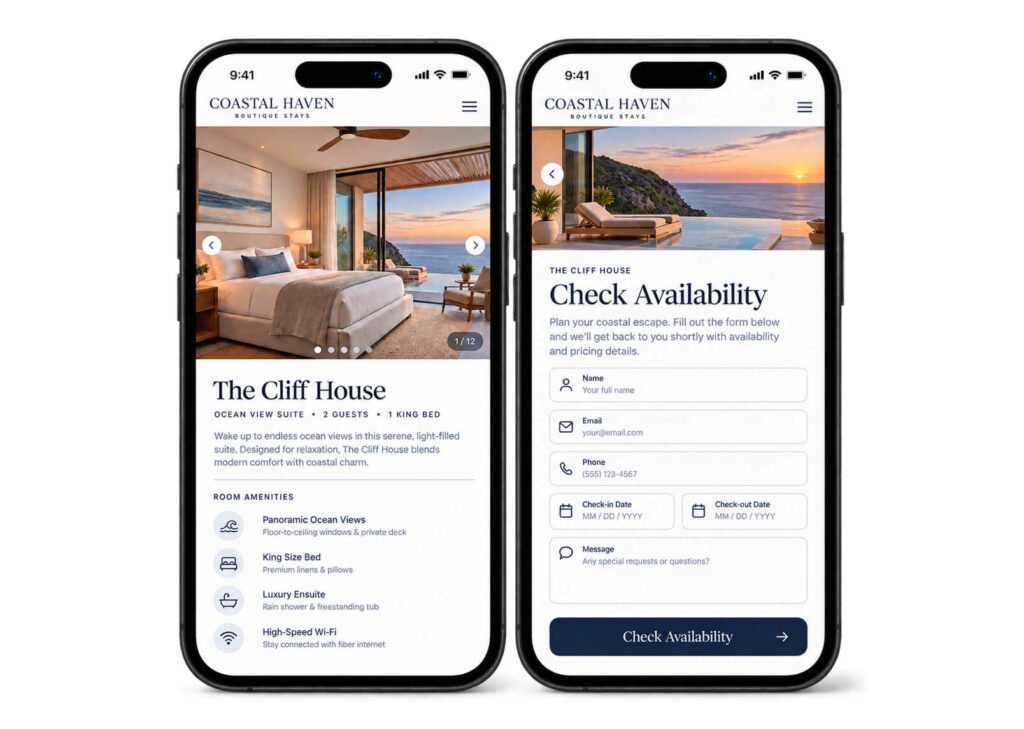
4. A Clear Booking or Enquiry Path
Every page should make the next step obvious.
Depending on how the business operates, that might be:
- Check Availability
- Book Your Stay
- Book on Booking.com
- Send an Enquiry
You do not need your own booking engine to have a useful website.
If Booking.com already works well for your property, visitors can explore the website first and then complete the reservation there.
The important thing is consistency. Guests should not have to search for the booking action or guess what different buttons mean.
5. Reviews and Trust Signals
Reviews help reduce uncertainty.
You can include selected feedback from Google, Booking.com or Tripadvisor, as well as other relevant trust signals such as:
- years in business;
- family-owned status;
- awards;
- review scores.
Reviews do not necessarily need their own page.
They can often work better beside room information, property highlights or booking calls to action.
6. Location and Things to Do Nearby
Guests want to know more than your address.
They want to understand what staying at your property makes convenient.
Show useful information such as:
- nearby attractions;
- restaurants;
- beaches or hiking trails;
- distance to the town centre;
- airports or stations;
- parking and directions.
This section can also support local SEO by helping search engines understand your location and what your property is close to.
For example, your website may become relevant to searches such as:
B&B near Biltmore Estate
or
guesthouse near Funchal old town
7. Practical Information and FAQs
Small practical questions can influence a booking decision.
Guests may want to know:
- Is breakfast included?
- Is parking available?
- Are pets allowed?
- What time is check-in?
- Are rooms upstairs?
- What is the cancellation policy?
Making this information easy to find reduces uncertainty and can also save owners from answering the same questions repeatedly by email.
8. A Good Mobile Experience
Your website should be just as easy to use on a phone as on a desktop.
Pay particular attention to:
- room galleries;
- navigation;
- booking buttons;
- text size;
- maps;
- enquiry forms.
Responsive design is not only about fitting the website onto a smaller screen.
The full guest journey should still feel simple.
What Pages Does a B&B Website Need?
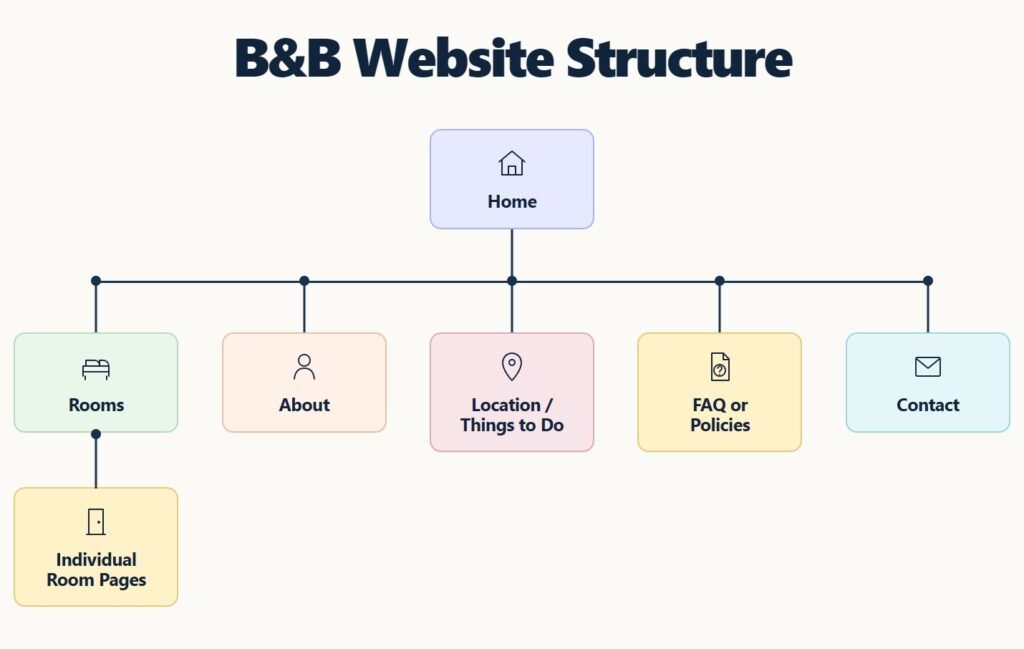
For many small hospitality businesses, a relatively simple structure is enough:
Home
Rooms
Individual Room Pages
About
Location / Things to Do
FAQ or Policies
Contact
Depending on the property, you might also add pages for breakfast, offers, events, accessibility or a local guide.
A five-room B&B does not need the same website structure as a large hotel.
Every page should have a clear reason to exist.
What a Good B&B Website Does Not Need
More features do not automatically create a better website.
Small hospitality sites often benefit from avoiding:
- complicated navigation;
- excessive text;
- generic stock photography;
- intrusive pop-ups;
- unnecessary animations;
- a booking engine that does not fit the way the business operates.
The focus should stay on the property and the guest.
Your Website Should Make Choosing Your Property Easier
A good B&B website is not the one with the most pages or features.
It is the one that gives potential guests enough information and confidence to make a decision.
They should be able to understand the property, compare rooms, see what the stay will feel like and know exactly what to do next.
For independent B&Bs, guesthouses, inns and small hotels, clarity is usually more valuable than complexity.
Next: How to Present Rooms on a B&B or Small Hotel Website
Is Your Website Making It Easy for Guests to Choose You?
I design and build websites for independent B&Bs, inns, guesthouses and small hotels, with a focus on clear room presentation, simple navigation and an easy path to booking or enquiry.
Tell me about your project